Black Friday is Friday, November 27. Set up your deals before it starts.Install free

Amazon-style deals for your Shopify store

For Shopify stores that run their own sales. Line up sales, limited-quantity deals and deals of the day: each one changes the real price, shows a countdown that ends when the deal does, and puts your regular price back after.

Free for 10 products in live deals at once, whatever the size of your catalog. Paid plans from $9.99 a month with a 14-day free trial. No usage charges.

Rated 5.0 on the Shopify App Store: 4 reviews

“…it delivered exactly what we needed: fast setup, flexible placement options, and clear urgency…”

A US store’s App Store review, January 2026

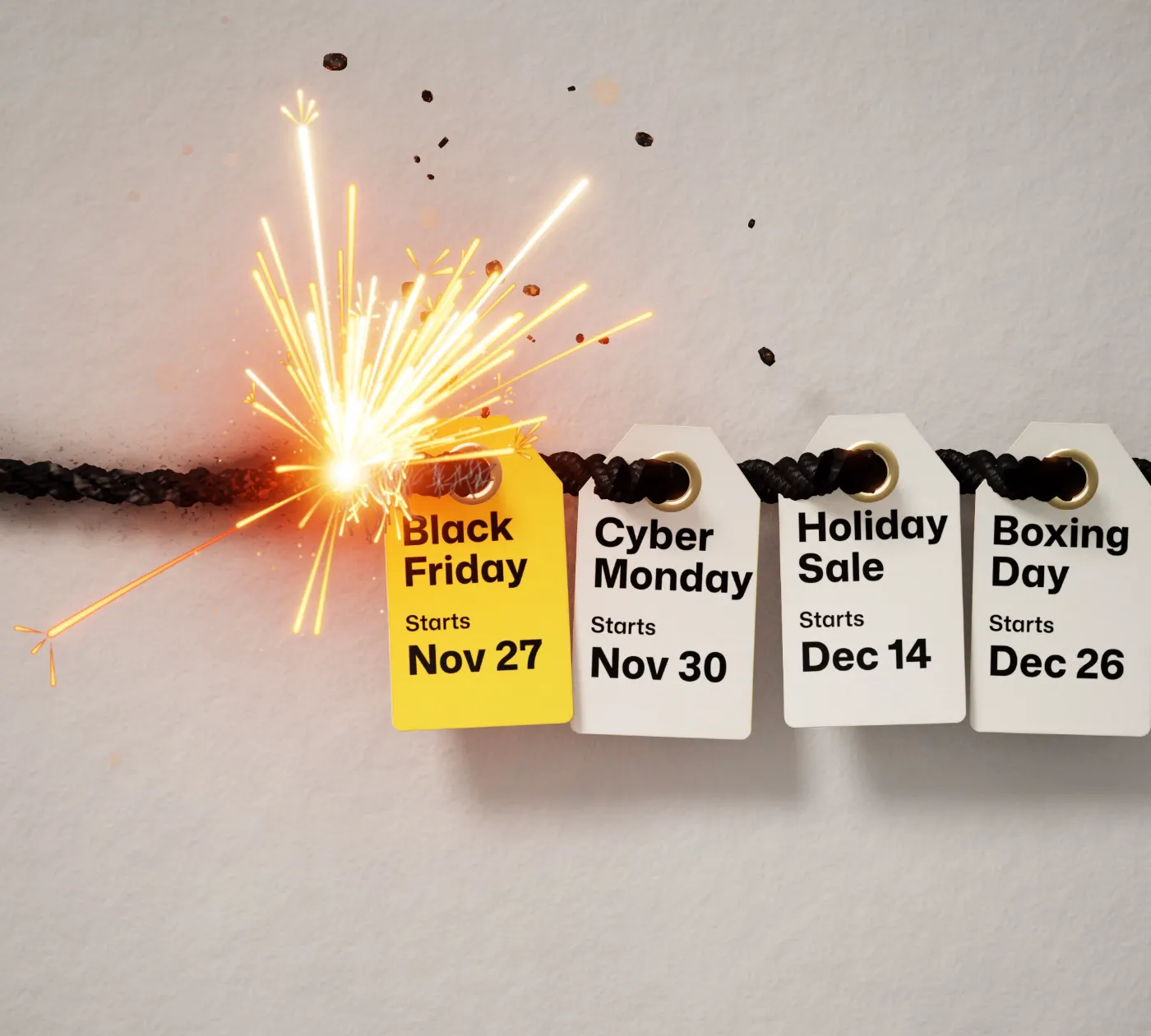
A lit fuse burning toward a row of price tags for the season: Black Friday on Nov 27, Cyber Monday on Nov 30, a holiday sale on Dec 14 and Boxing Day on Dec 26.

Lightning Deals: Flash Sales is a Shopify app by Movatech LLC. It changes a product’s real price on a schedule, shows shoppers the deal with a countdown, a sold bar or an “only 3 left” line, and puts the regular price back when the deal ends. The Free plan covers up to 10 products in live deals.

This page describes version 2.0, released in October 2026. Facts checked November 5, 2026.

How does Lightning Deals work?

Set up your deals weeks ahead: Black Friday, Cyber Monday and December, in one sitting. At each start time the deal price becomes the product’s real Shopify price, so it shows on product pages, in the cart and at checkout without a code. At each end, the app puts back the regular prices it changed.

1

Create a campaign

Pick a deal type, products or whole collections, the discount and the dates. A preview shows what shoppers will see before anything goes live.

2

Line up the next ones

Schedule Cyber Monday, a gift guide and Boxing Day behind it. Each one waits for its start time. Then the app writes its deal prices into Shopify, with the regular price crossed out, and checks each one in Shopify. Starter and up schedule as many as you like; the Free plan schedules 2 at a time.

3

Each one ends on its own

When a schedule ends or the units sell, the app puts back the regular prices that campaign changed, and the next one starts at its own time. You see gross sales, orders, items sold and total discounts for each.

Watch four campaigns run, scheduled weeks ahead

Black Friday weekend, Cyber Monday, a holiday gift guide and Boxing Day clearance, all set up in one sitting. Drag the slider or pick a moment.

Four campaigns scheduled ahead, two live at once and the rotating banner need Starter or above. The Free plan allows 1 live and 2 scheduled campaigns at a time.

Friday, Nov 27, 12:01 AM

Black Friday weekend started at 12:00 AM. By 12:01 AM the app has written $59.25 as the sneaker’s price in Shopify and checked it. The other three campaigns wait for their dates.

Your lineup, November 26 to December 31

Illustration with example numbers. Screens and labels follow the real app.
  • Black Friday weekendActiveLimited-quantity deal, Nov 27 to 30
  • Cyber MondayScheduledSale on 8 accessories, Nov 30
  • Holiday gift guideScheduledSale on 24 products, Dec 14 to 24
  • Boxing Day clearanceScheduledClearance, from Dec 26, no end date
your-store.com/products/skate-low-sneakerWhat shoppers see
25% offBlack Friday0% soldEnds in3days23hrs58minSee 3 deals →
NorthlineCatalogContact
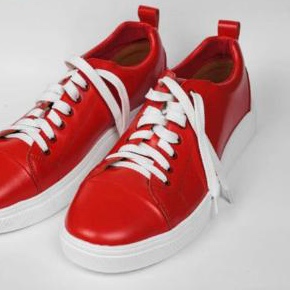
Skate Low Sneaker in burgundy canvas on an orange and blue background

NORTHLINE

Skate Low Sneaker, Burgundy

$79.00 USD$59.25 USD

25% offLimited qtyEnds Mon, 11:59 PM
0% soldYou save $19.75
Add to cartBuy it now
What you see in the app
Black Friday weekendActive

Limited-quantity deal. 25% off 3 sneakers, 12 units of each.

Price in Shopify, Skate Low Sneaker

$59.25$79.00

Deal price. The regular price shows crossed out.

3 of 3 deal prices synced with Shopify at Fri, Nov 27, 12:01 AM ET

Skate Low Sneaker sold

0 of 12 deal units

Schedule

Fri, Nov 27, 12:00 AM to Mon, Nov 30, 11:59 PM
Will it mess up my prices?

Every deal price is checked in Shopify after it’s written. If one can’t change, you get an email. An emergency pause puts every price back at once.

24 of 24 deal prices synced with Shopify

Checked in Shopify

After it writes a deal price, the app checks it in Shopify and shows how many are confirmed.

Needs attention: 1 product

An email if a price can’t change

The store owner gets an email, and the product shows under Needs attention in the app. If a price can’t be put back, the owner gets an alert.

Emergency pause

One switch puts every price back

Emergency pause in Settings restores every regular price and holds scheduled starts until you say go.

Tag: never-discount

Your prices, your rules

Change a price yourself during a deal and that variant leaves the deal and keeps your price. (While a bulk update runs, the app asks you to wait.) Products you tag as excluded are never discounted, even in a storewide sale.

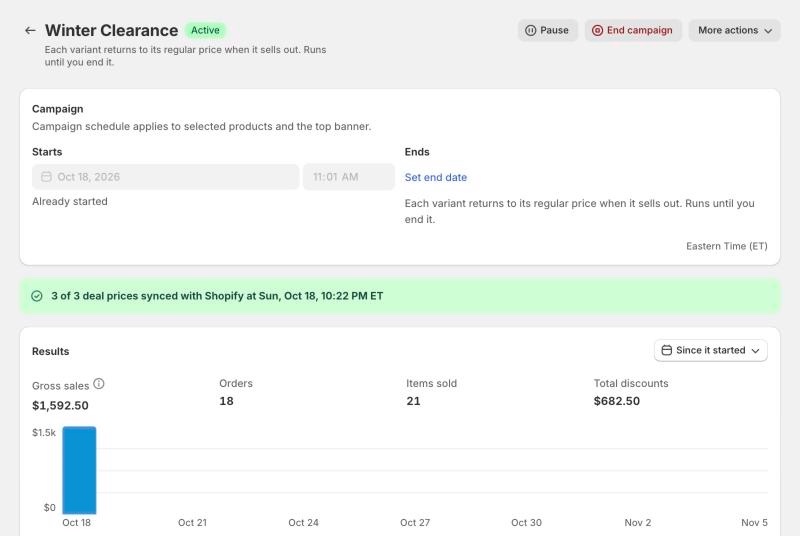
A live Clearance campaign in the app: 3 of 3 deal prices synced with Shopify, with results for gross sales, orders, items sold and total discounts.

A live campaign on our development store, November 5, 2026. Test data.

Before you uninstall

End or pause your live deals first. Shopify cuts an app’s access the moment it’s uninstalled, so the app can’t put prices back after that. If a deal is live when you uninstall, you get an email with a file of your regular prices.

Version 2.0 rebuilt the price engine in October 2026.

What do shoppers see?

A top banner, deal cards, collection badges and a Deals page. You add the banner, cards and badges in Shopify’s theme editor, with no code, and set up the Deals page once in Settings. They follow your theme’s fonts and colors, or yours.
A countdown across every page

Pick one of 23 banner looks, or make your own from your store’s colors. Six of them:

30% offBlack Friday37% soldEnds in 1day05hrs59minSee 24 deals
Your store’s header
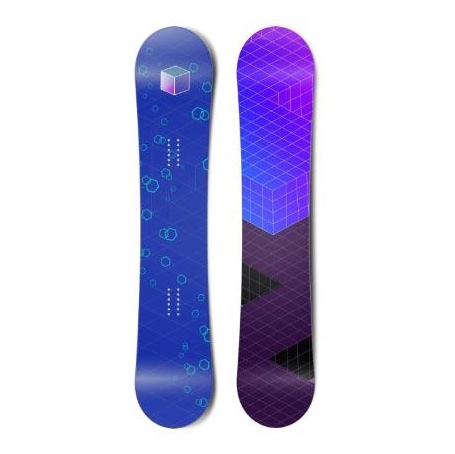
Powder Hunter 156 Snowboard, top and base

Powder Hunter 156 Snowboard

$479.00 USD$383.20 USD

20% offDeal of the dayEnds in 10:48:04

You save $95.80

A deal card next to the price

The badge, the countdown, a bar and what the shopper saves. Four layouts: timer and bar, timer only, bar only, or badge only.

Retro Runner Sneaker in red leatherCLEARANCE

Retro Runner Sneaker

$140.00 $98.00

30% off

Only 5 left at this price

Desert Slip-On Sneaker in blue suedeLIMITED TIME

Desert Slip-On Sneaker

$75.00 $56.25

25% off

Ends in 1d 4h

Badges in the product grid

Deals stand out on collection pages: the badge, the countdown, and a sold bar on limited-quantity deals. Clearance shows how many are left instead of a clock.

your-store.com/collections/deals

Deals

Black Friday starts in

9d 04h

Email addressNotify me

A Deals page and home page sections

Every live deal on one page you can link from emails, ads and your menu. Home page sections for live deals, upcoming deals, a campaign countdown and a deal spotlight. On Growth and Pro, “Notify me” sign-ups go to your Klaviyo list.

Examples on a demo store; the numbers are illustrations. Shopper text comes in English, German, Spanish, French and Dutch. Every state is covered: upcoming, live, sold out (the product stays buyable at its regular price) and ended.

Which kinds of deals can I run?

Four deal types. Pick one when you create a campaign; each shows shoppers something different.

Sale

All plans

A temporary price cut that returns to the regular price when the schedule ends.

For example: 20% off everything from Black Friday to Cyber Monday.

Shoppers see: the discount, “Limited time”, a countdown and a bar of time passing.

Retro Runner Sneaker in red leather

Retro Runner Sneaker

$140.00$112.00

20% offLimited timeEnds in 1d 4h
You save $28.00

Questions merchants ask about Lightning Deals

Short answers, each complete on its own. Checked November 5, 2026, against version 2.0 and the Shopify App Store listing.

Not answered here? Email [email protected]. The people who build the app reply.

The app and its price

What is Lightning Deals?

Lightning Deals: Flash Sales is a Shopify app by Movatech LLC for Amazon-style deals on your own store: Sale, Limited-quantity deals, Clearance and Deals of the day. Each deal changes the product’s real Shopify price on a schedule and shows shoppers the deal with a countdown, a sold bar or an “only 3 left” line. When the deal ends, the app puts back the regular prices it changed.

Scheduling and your prices

What shoppers see

Fit with your store

What will I see in my Shopify admin?

The app opens inside your Shopify admin and uses Shopify’s own design, so it looks like part of Shopify. Home shows what’s live and what’s next, then come Campaigns, Design, Theme Blocks and Settings.
Lightning Deals/Home
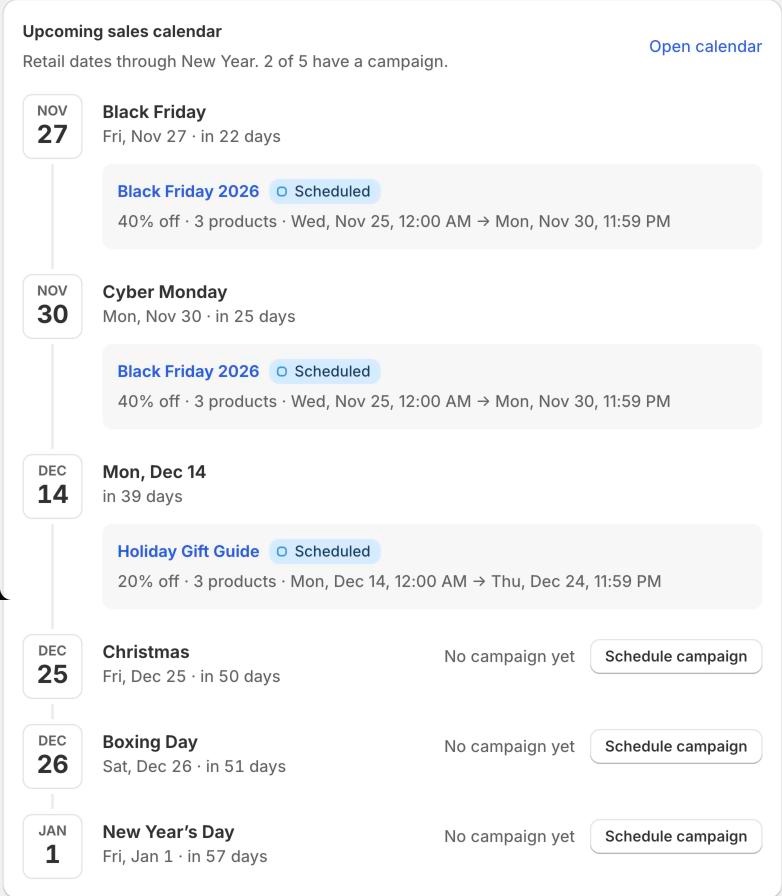
The app’s upcoming sales calendar on Home: Black Friday and Cyber Monday covered by a scheduled Black Friday 2026 campaign, a Holiday Gift Guide scheduled for Dec 14 to 24, and Christmas, Boxing Day and New Year’s Day each with a Schedule campaign button.

Home: the dates ahead

Home lists the retail dates through New Year and shows which ones already have a campaign. Here, one Black Friday campaign covers Black Friday and Cyber Monday, and a holiday gift guide is scheduled for December 14 to 24.

Lightning Deals/Campaigns/Create campaign
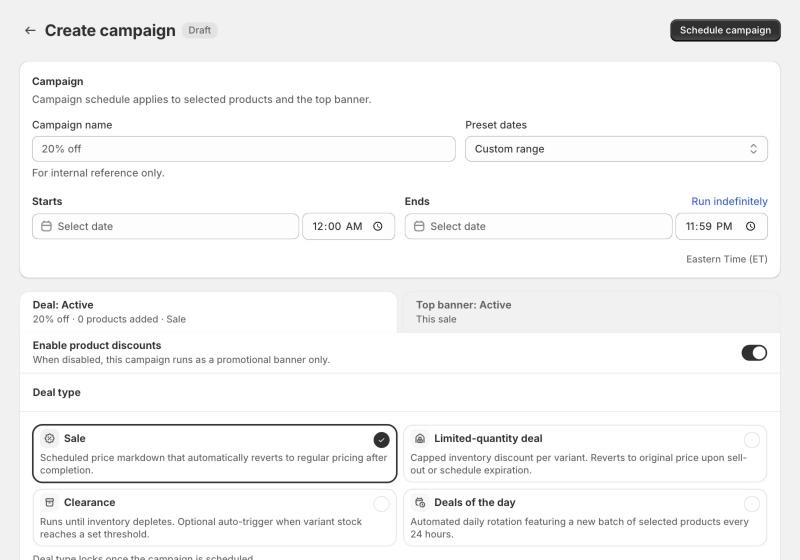
The app’s Create campaign page: campaign name, preset dates, start and end date and time in Eastern Time, switches for the deal and the top banner, and the four deal types: Sale, Limited-quantity deal, Clearance and Deals of the day.

Create a campaign

Name it, set the dates, pick a deal type, then choose products or collections. You decide for each campaign whether the top banner shows it.

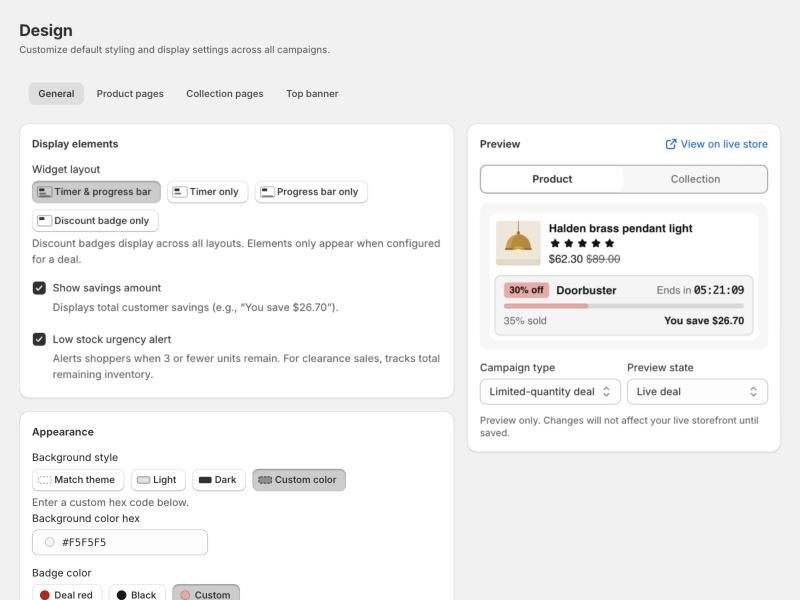
Lightning Deals/Design/General
The Design page, General tab: deal card layouts (timer and progress bar, timer only, progress bar only, discount badge only), savings and low-stock options, colours, and a live preview of a product with a 30% off Doorbuster card: Ends in 05:21:09, 35% sold, You save $26.70.

Style the deal card

Pick the layout, the background and the badge colour. The preview shows the card on a product page or a collection tile while you change it.

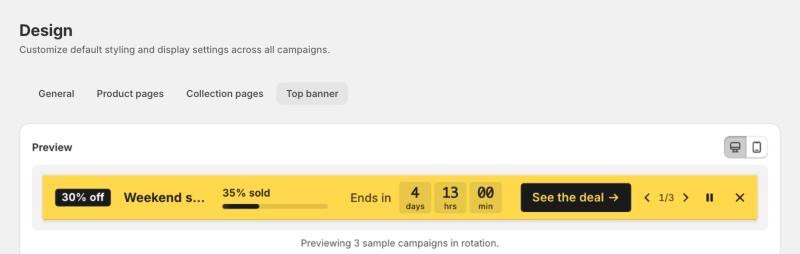
Lightning Deals/Design/Top banner
The Design page, Top banner tab: a preview of the yellow banner with 30% off, 35% sold, Ends in 4 days 13 hrs, a See the deal button and 1 of 3 controls, previewing 3 sample campaigns in rotation.

Style the top banner

Choose a layout and a colour look. When several campaigns are live, the banner rotates between them (Starter and up).

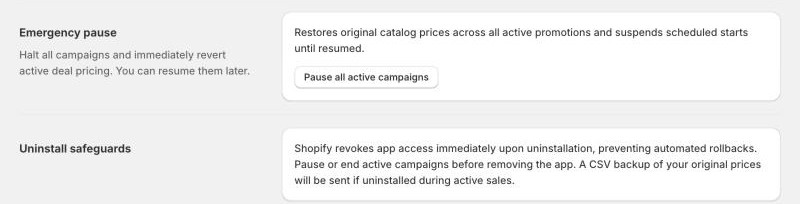
Lightning Deals/Settings
Settings: Emergency pause, which restores original prices across active promotions and holds scheduled starts until resumed, and Uninstall safeguards.

Emergency pause and the uninstall note

Emergency pause puts every regular price back and holds scheduled starts. The uninstall note says what to do before you remove the app.

Captured on our development store on November 5, 2026. One more admin screen is on this page: a live campaign’s results under “Will it mess up my prices?”.

Is the countdown real?

Yes. The countdown ends when the deal does. In version 2.0 the sold bar counts real sales only. A limited-quantity deal stops when its units sell; in a rush, a few more can sell while Shopify updates the price. There’s no setting for a timer that resets on refresh, and no “people viewing” numbers.

Open your store in a private window and you’ll see the same deal with the same end time. That’s a quick test for any timer, ours or anyone’s.

Your browser

Skate Low Sneaker

25% off

Ends Mon, Nov 30, 11:59 PM

Private window

Skate Low Sneaker

25% off

Ends Mon, Nov 30, 11:59 PM

Same deal, same end time.

How is this different from a countdown timer app?

Some timer apps show a clock and leave the price to you. Some price schedulers change and restore prices, and many now add labels, timers or a deals page. Lightning Deals runs the price, the countdown and the banner from one campaign. Whatever you pick, check these five things.

What to check in any app
Lightning Deals
Does it change the product’s real price?
Yes. The deal price is the product’s Shopify price, with no code at checkout.
Does the countdown end when the deal ends?
Yes. One schedule drives both.
Does the regular price come back?
Yes. If a price can’t be put back, you get an alert.
Limited-quantity deals and a sold bar of real sales?
Yes.
Top banner, deal cards, badges and a Deals page?
Yes.

Apps differ, so check each listing. Checked November 5, 2026, for Lightning Deals only.

How much does Lightning Deals cost?

Free for up to 10 products. Paid plans are $9.99, $19.99 or $29.99 a month, with a 14-day free trial. No usage charges and no share of your sales.

Free

$0

Free plan, not a trial

  • 10 products in live deals at once
  • 1 live campaign, 2 scheduled
  • Sale, Limited-quantity deal and Clearance
  • Countdowns on product and collection pages
  • Prices change and come back on schedule
  • Top banner in all 23 looks
  • Deals page
For a full season

Starter

$9.99 a month

14-day free trial

  • Everything in Free
  • 200 products in live deals
  • 3 live campaigns, unlimited scheduled
  • A Shopify collection for each campaign
  • Every banner type: announcements, drops, discount-code announcements, free shipping
  • Rotating ticker and banner priority

Growth

$19.99 a month

14-day free trial

  • Everything in Starter
  • 2,000 products in live deals
  • Unlimited campaigns
  • Deals of the day
  • Klaviyo sign-up sync

Pro

$29.99 a month

14-day free trial

  • Everything in Growth
  • Unlimited products
  • Developer API
  • Priority support

Prices in US dollars, as listed on the Shopify App Store on November 5, 2026. Billing goes through your Shopify invoice. Every plan is a flat monthly price.

What do the four reviewers say?

Four reviews so far, all five stars. Most of them mention the support.

“We used Lightning Deals & Discounts during one of our sales and it delivered exactly what we needed: fast setup, flexible placement options, and clear urgency…”

A US store. Shopify App Store review, January 2026.

“The Movatech Team will take great care of you! Lighting fast support and always there to help.”

Designs By Joy, United States. Shopify App Store review, October 2025.

“Does what it is suppose too and the developers will go above and beyond helping you get it installed.”

DIY Retro Arcade, United States. Shopify App Store review, edited December 2025.

“Very responsive support and smooth implementation overall…”

Movie Code Club, United States. Shopify App Store review, May 2026.

Read the reviews on the Shopify App Store

What doesn’t Lightning Deals do?

Better you hear it here than after you install.

  • No discount codes. The app doesn’t create them: deal prices are real prices. Your own codes still apply on top.
  • No “people viewing” or “sold today” counters. The sold bar shows real units only.
  • No email or SMS sending. Sign-ups go to your Klaviyo list, on Growth and Pro.
  • No sold-out waitlist and no delivery-deadline countdowns.
  • No per-market, B2B or point-of-sale pricing. Because deal prices are real, they also reach point of sale and Facebook and Instagram while a deal runs. The app warns you before you schedule.
  • No A/B testing. The admin is in English.
  • Uninstalling doesn’t put prices back. Shopify cuts an app’s access at uninstall, so you get an email with a file of your regular prices. End or pause deals first.

Who makes Lightning Deals?

Movatech LLC. The people who build the app answer support, at [email protected].

Getting help

Chat with us from the app’s Home, or email [email protected]. Pro plans get priority support.

What’s new: version 2.0 (October 2026) brought a new admin, new storefront widgets and a rebuilt price engine. The Home screen now shows the retail dates ahead and which ones already have a campaign.

Lightning Deals at a glance

Name
Lightning Deals: Flash Sales
What it is
A Shopify app for scheduled deals on real prices
Earlier names
Lightning Deals & Discounts; Lightning Deals: Sales Booster
Made by
Movatech LLC (mailing address: 10685-B Hazelhurst Dr. #44105, Houston, TX 77043)
Deal types
Sale, Limited-quantity deal, Clearance, Deals of the day (Growth and Pro)
Plans
Free (10 products), Starter $9.99, Growth $19.99, Pro $29.99 a month
Trial and charges
14-day free trial on paid plans. No usage charges.
Works with
Shopify’s theme editor (theme app blocks), Klaviyo (Growth and Pro)
Shopper languages
English, German, Spanish, French, Dutch
History
Launched April 30, 2025. Version 2.0 in October 2026.
Updated
November 5, 2026

Black Friday is Friday, November 27.

Install it free, schedule your deals, and be ready for Black Friday.

Free plan: 10 products. No usage charges. Paid plans from $9.99, with a 14-day free trial.

Scroll to Top